
Stay in control of your business — without complex systems.
GoSevia helps single-location business owners manage inventory, invoices, clients, and reports in one simple, subscription-based platform.

What is GoSevia?
Running a business shouldn’t feel overwhelming.
GoSevia is an owner-first business management platform designed for small, single-location businesses that want clarity without complicated tools.
Core tools to manage your day-to-day operations — in one clean dashboard.
GoSevia is a software tool designed to support internal business operations. It is not a POS system, accounting software, or tax filing service.
Who it's for?
GoSevia is built for:
Single-location business owners
Owner-operated shops with 0–2 staff
Retail and product-based SMEs
Businesses that value simplicity and clarity
Pricing (VAT-exclusive)
Basic – ₱2,499 / month
Monthly subscription. Billed automatically.
Essential tools to manage inventory, invoices, and clients.
Growth – ₱3,999 / month
Monthly subscription. Billed automatically.
Advanced features for growing visibility and control.
Billing & Subscription Summary
All paid plans are billed monthly in advance. Subscriptions renew automatically each billing cycle unless cancelled before the next billing date.
You may cancel anytime from your account dashboard. Cancellation takes effect at the end of the current billing period.
All subscription fees are non-refundable. All prices are VAT-exclusive. Applicable VAT may be applied at checkout where required by law.
For full details, please review our Terms of Service.
Free Trial
Try GoSevia free for 14 days.
No credit card required during trial.
At the end of the trial period, you may select a paid monthly subscription to continue using the platform.
Key Features
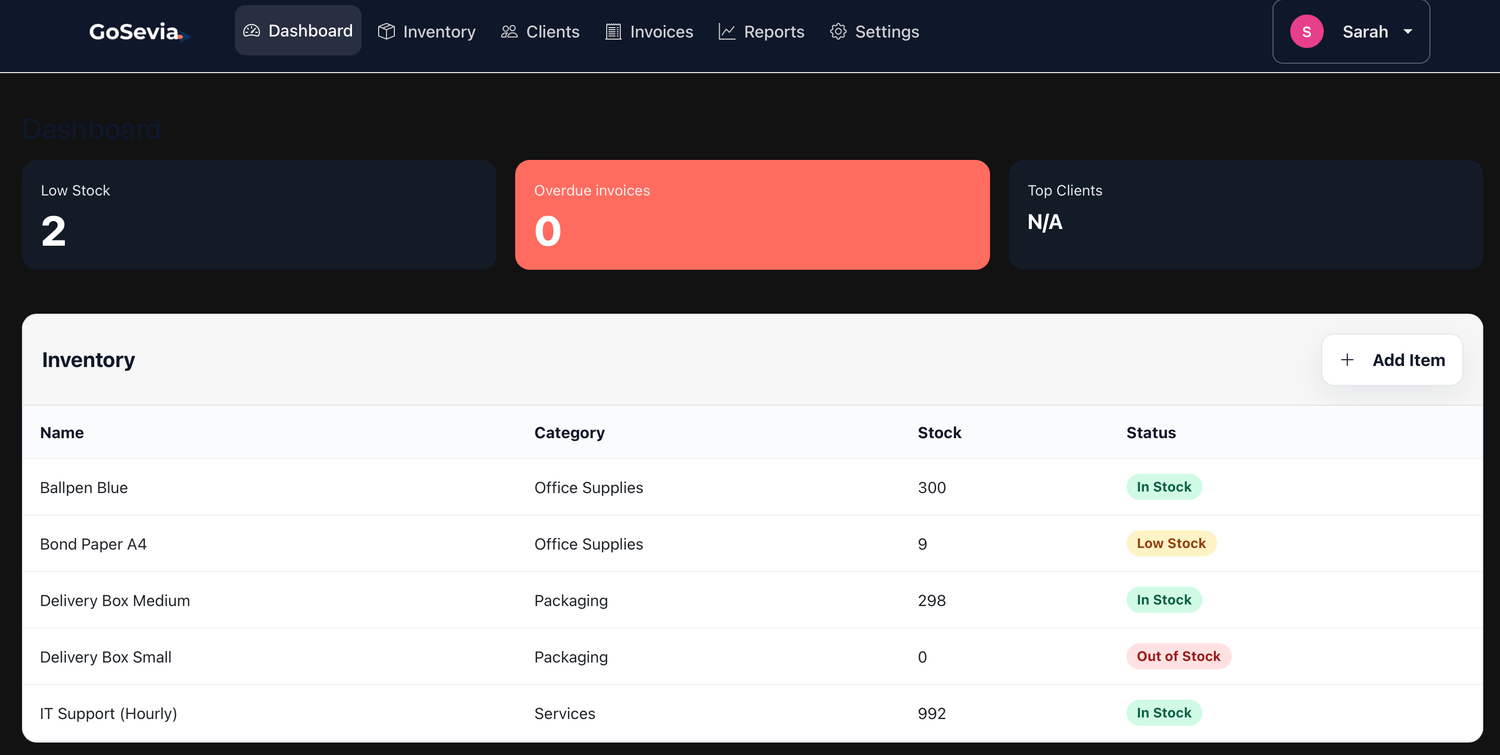
Inventory Management
Track products, monitor low stock, and stay ahead of reorders.
Invoicing
Made Simple
Create, send, and track invoices. Always know what’s paid, pending, or overdue.

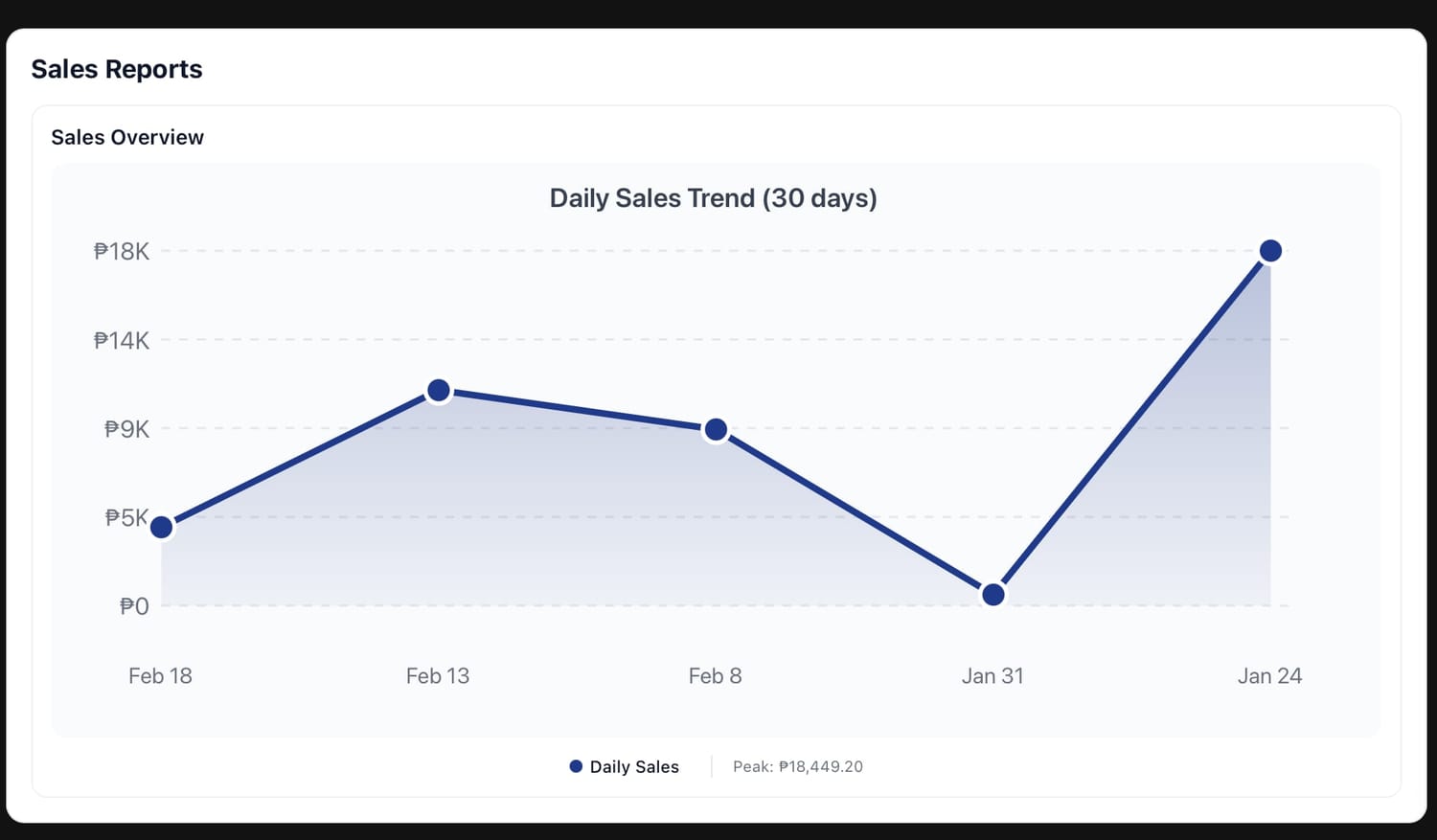
Clear Business Reports
Understand your sales, top products, and performance at a glance — no spreadsheets needed.
Client Management
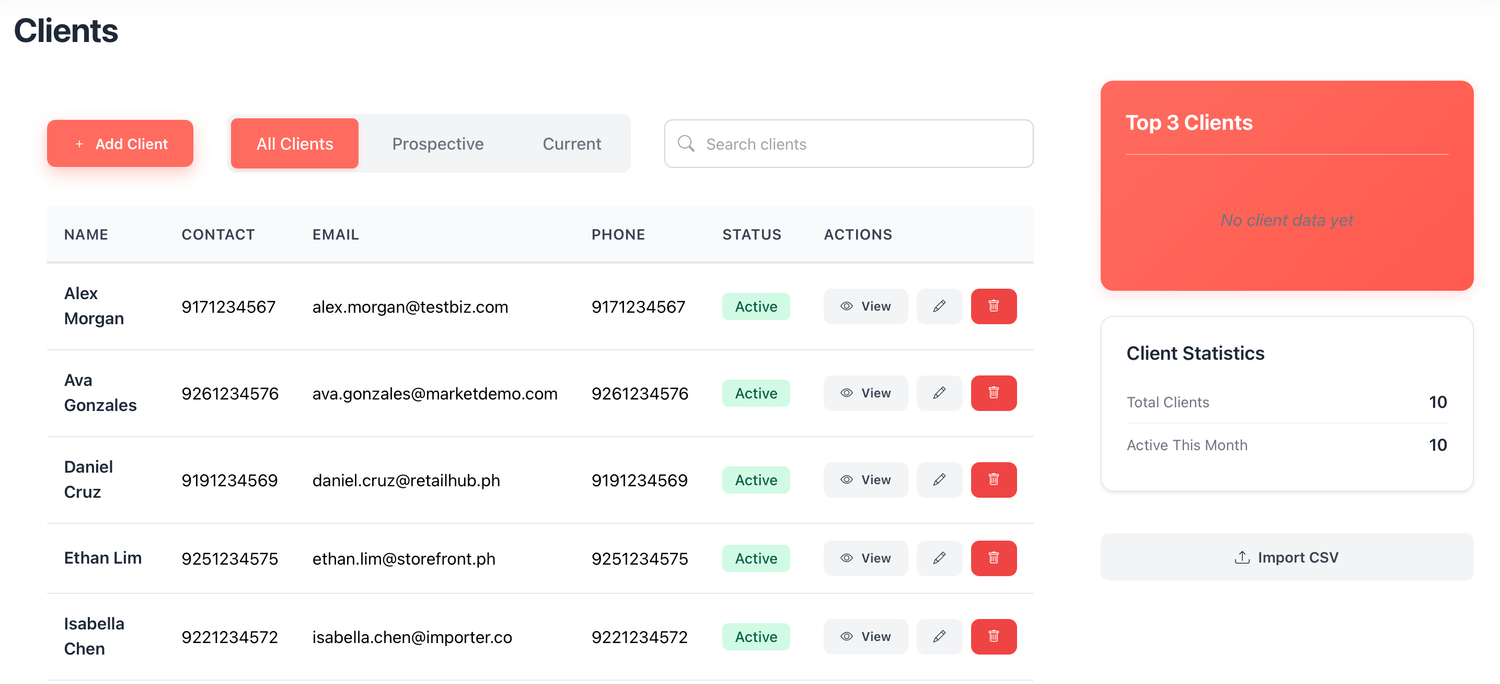
Keep all your client information organized and up to date.
Smart email alerts
Receive notifications for low stock levels and upcoming invoice due dates.

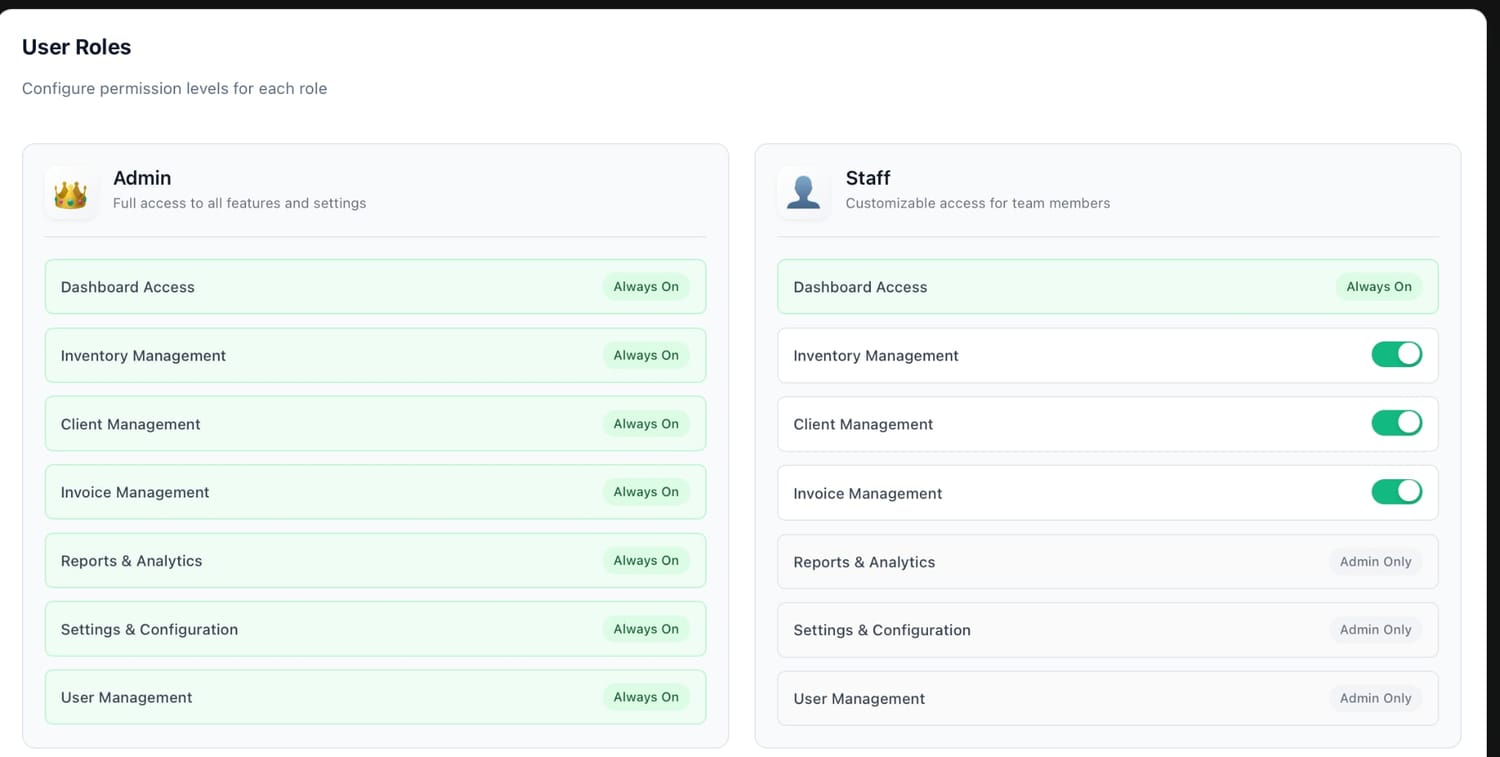
Role-Based Access
Keep financial insights for admins while staff focus on daily tasks. Simple, secure permission control.
It’s time to level up your business.
Get in touch with GoSevia today and see how management software can help you stand out and succeed online.

Understanding GoSevia
1
GoSevia helps business owners stay in control without using complex systems.
It brings your inventory, invoices, clients, and reports into one clean platform so you can:
Track stock levels and top-selling items
Know which invoices are paid, pending, or overdue
See simple reports without spreadsheets
Reduce mental load and manual tracking
GoSevia is designed to be owner-first — intuitive, practical, and easy to use even if you manage the business yourself. provide answer
2
Signing up is simple:
Use your business email address to create an account
Select your business type:
Product-based
Service-based
Mixed (both products and services)
Choose your subscription plan
Enter your payment information
You’re ready to go
If you’re on the Growth plan, you can add staff members by:
Going to User Management
Entering your staff’s name and email
Creating a temporary password
Asking them to log in and change their password if they wish
3
Yes. GoSevia takes data protection seriously.
We collect only the information needed to operate the platform
Payment information is handled by trusted third-party payment providers
We do not sell personal data
Reasonable security measures are in place to protect your information
For full details, please refer to our Privacy Policy.
4
GoSevia lets you choose how your business operates so the system tracks things correctly.
Product-based businesses sell physical items that have stock quantities.
Examples: retail shops, online sellers, distributors, food products, beauty products.Service-based businesses sell time, skills, or services and usually don’t track stock the same way.
Examples: consultants, freelancers, agencies, salons, repair services.Mixed businesses sell both products and services.
Examples: salons that sell hair products, clinics that sell treatments and retail items, workshops that sell materials plus services.
Choosing the right type helps GoSevia calculate inventory, invoices, and reports more accurately.
5
You can upload your data using CSV import.
Here’s how:
Go to the section you want to upload (Inventory, Clients, or Invoices).
Click Import CSV.
Download the provided template.
Copy the template exactly as shown — do not rename or remove columns.
Enter your data, then upload the completed CSV file.
⚠️ Important note about inventory and past invoices:
When setting up your inventory, make sure to include the total quantity already sold in your past invoices in your starting inventory.
Why this matters:
GoSevia automatically subtracts items listed in invoices from inventory.
If you only enter your current stock without accounting for past sales, your inventory may appear lower than it actually is.
Adding the full historical quantity ensures your inventory reflects accurate, present-day stock levels after invoice deductions.
6
his is normal, especially in the early stages.
When there’s:
very little data, or
no comparable period yet (for example, first 30 days vs. next 30 days),
the system may show large or unexpected percentage changes.
As more data is added over time, reports will naturally stabilize and give a more accurate picture of your business performance.
Think of early reports as directional, not final. Accuracy improves as your data grows.
7
Your inventory page gives you instant visibility into how your products are performing.
You’ll be able to see:
Top-selling products
Low-stock items (tagged per line item)
Out-of-stock products
Your inventory stats show:
Total number of items
How many items are low stock
How many items are out of stock
This helps you spot issues early before they affect sales.
8
You can customize low-stock alerts in Inventory Settings.
The default low-stock threshold is 10 units
You can increase or decrease this number based on your business needs
If you don’t set a custom number, GoSevia automatically uses the default.
9
Yes.
Inside Inventory Settings, you can:
Enable low-stock email alerts
Enable invoice status email alerts
Once enabled, GoSevia will notify you so you don’t miss important updates.
10
Try GoSevia free for 14 days.
No credit card required. Upgrade anytime to continue using the platform.
11
On the Clients page, you can:
View all clients you’ve added to the app
Search clients by name using the search ba
Client statistics show:
Total number of clients
Which clients have been active for the current month
12
Invoices are clearly labeled so you always know what’s happening.
Draft – still being prepared
Final – sent but not yet paid
Paid – successfully completed
Overdue – past the due date
13
Yes.
In Invoice Settings, you can enable:
Invoice status alerts
Due date reminder emails
These alerts help you follow up and manage cash flow more easily.
14
Yes.
Within Invoice Settings, you can set a default tax percentage that automatically applies to your products or services, if needed.
This saves time and keeps invoicing consistent.
15
GoSevia is designed so everyone focuses on what matters most.
Staff accounts
Cannot view reports or total earnings
Focused on daily operational tasks
Admin accounts
Can access reports and revenue insights
Intended for owners, accountants, and decision-makers
This keeps sensitive financial data secure.
16
The dashboard is your quick business overview.
It shows:
Top clients
Low-stock items
Number of items running low
Overdue invoices
Inventory summary
Recent invoices
It’s designed for fast check-ins without digging into details.
17
n Profile Settings, you can:
Update your full name
Change your email address
Change your password
18
Under Plan & Billing, you can:
Upgrade from Basic to Growth
Switch plans if your needs change
19
In Overview, you’ll find:
Your organization information
Your current subscription plan
A Contact Support option to email GoSevia directly for feedback or inquiries
Need help or found an issue?
Please feel free to email us at support@gosevia.com if you encounter any bugs, difficulties, or have questions while using the app.
We value your feedback and continuously improve GoSevia based on real user input.
Expect a response within 24–48 hours.
Let's start the journey!

GoSevia Software Publishing Services
9th Floor AIA Tower8767 Paseo De Roxas
Salcedo Village, Bel-Air1209 City of Makati
NCR, Philippines
Support: support@gosevia.com
Links:
Start Your 14-Day Free Trial
Create your account below to begin your free trial.
No credit card required during trial.
After the 14-day trial, you may upgrade to a paid monthly subscription.
Paid subscriptions renew automatically each month unless cancelled before the billing date.